
Lately, I’ve been really into digital art. Honestly, I think I’ve just been avoiding the messy cleanup that comes with traditional art.
This is my first full Procreate study with an entire scene. Usually, I just doodle in Procreate or make little stickers and clipart, so this felt like a bigger step. It was also my first time at Original Joe’s, a popular Italian-American restaurant in San Francisco and Daly City.
Digital art looks hard, and it is hard.
In both traditional and digital art, layers are important, but they do not work the same way. With digital art, you have actual layers and different blend mode options. With traditional art, you kind of have to understand how each layer will interact with the next one. This is especially true with mediums like watercolor, where once you put something down, it is kind of there forever.
One thing I love about digital art is the ability to go back and erase something if I do not like it. But that is also where my perfectionist tendencies start creeping in.
To be honest, I had no idea what direction I was going with this piece. Did I want to use a specific digital medium? Was there a specific digital art style I was inspired by? Nope. I just went with the flow, and this is where it led me.
What I learned:
Name your layers. It makes it so much easier to find things later. There will always be layers you want to go back and fix, and it becomes a nightmare when you are digging through a bunch of random unnamed layers trying to figure out where something is.
Stop treating digital layers like traditional art layers. There were moments where I wanted to blend two areas together, but they were on separate layers, so they were not actually mixing.
Experiment with different digital mediums. This is the fun part. You can practically use any “medium” you want, and if you do not like it, you can just delete it.
Learn blend modes.
Normal is the default paint mode. It is good for base painting and flat color.
Multiply darkens colors. I think of it like a transparent shadow glaze. This is useful for adding dimension, especially shadows.
Screen lightens everything. I think of it like light shining through paint. It is useful when you want to show sunlight hitting an object.
Add or Linear Dodge makes things super bright. This feels like something only digital art can do easily, like creating sparkles, neon lights, or magical effects.
Overlay adds contrast and color richness. I think of it like placing a transparent color film over the piece. It can be useful when you are trying to capture a specific mood or make something feel warmer or cooler.
Soft Light is a more toned-down version of Overlay, so it feels more natural. It is useful for gentle lighting, skin tones, or subtle color adjustments.
Color mode changes the color without changing the values. This is helpful when you chose the wrong color but are already happy with the shading.
Luminosity is kind of the opposite of Color mode. It changes the brightness without changing the color, which is helpful when you are focusing on values.
Alpha Lock and Clipping Mask are tools that help you color inside a shape or line work without affecting other layers.
Key takeaway:
Fundamentally, traditional and digital art are similar. You still sketch, map out shapes, add key colors, work in layers, and build up details. The main difference is that digital art gives you more freedom to experiment because you can always undo, erase, delete, or revert changes you do not like.
That freedom is fun, but it also makes it easy to overthink everything.
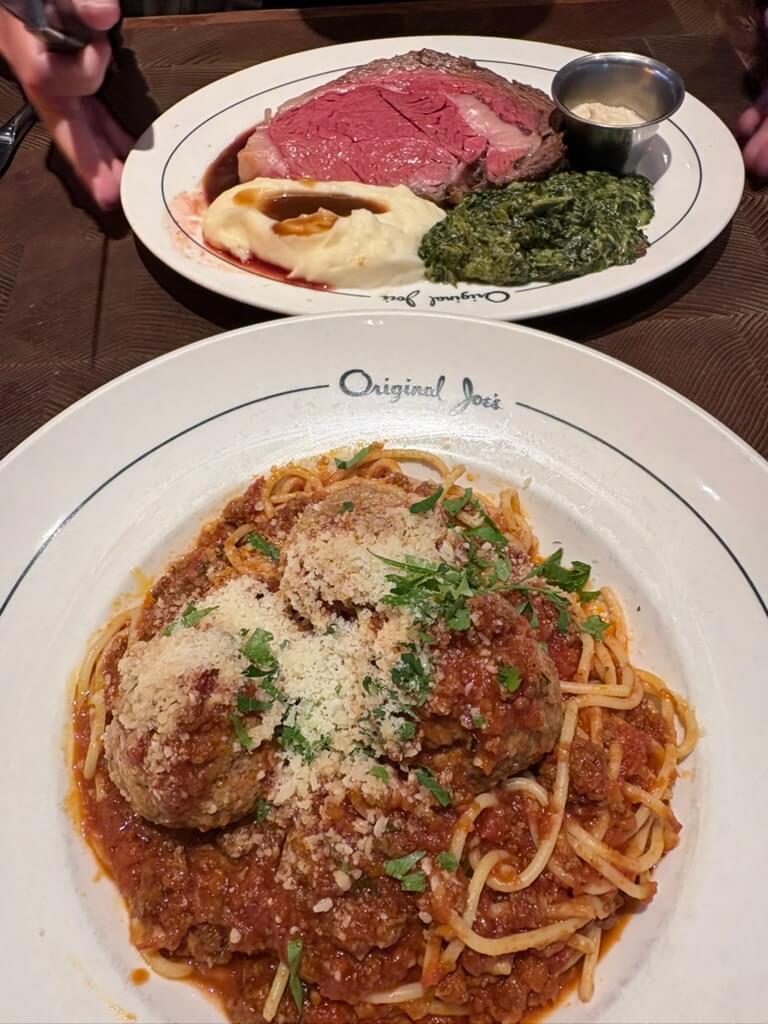
Original/Reference Photo: Prime Rib & Spaghetti and Meatballs